Wellhub integration

Wellhub bookings, in the schedule you already run

Your classes reach Wellhub on their own, and the bookings come back into the same class as everyone else's: same capacity, same register, same coach. No second tab open all day and no spreadsheet to reconcile at the end of the month.
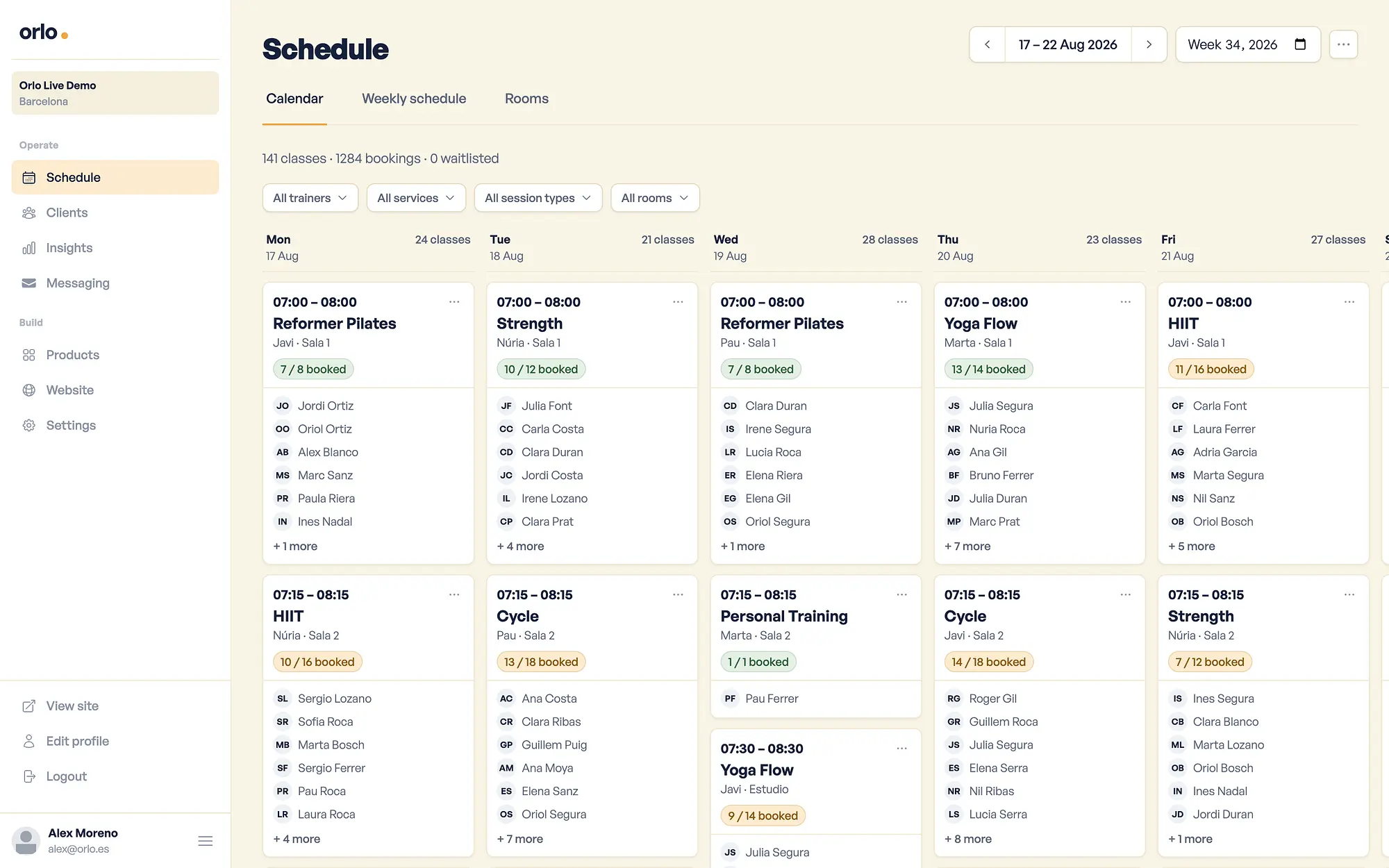
A weekly schedule view displaying multiple fitness classes with instructor names and booking availability
Capacity Whatever you set
Class register Just the one
Publishing classes Automatic
Two systems for the same class

Wellhub brings new people into your studio. The cost isn't those people — it's keeping their bookings somewhere other than where you keep everything else.

Two capacities that never talk

You block places for the provider by eye, and then there are too many or too few. The class ends up half empty, or with people at the door who don't fit.

The register is never complete

The coach opens up without knowing who's coming from outside, and attendance goes in a notebook — or nowhere at all.

You move a class and it stays put in Wellhub

You move Tuesday's pilates and people keep booking the old time. Somebody turns up when there's no longer a class.

One booking, end to end

What happens when somebody books through Wellhub

Without anyone on your team opening anything.
In Wellhub

A member books your class

From their app, on their plan.

Straight away

The place comes out of your capacity

The same class and the same allowance as your own members.

In your dashboard

They appear on the class register

With their name and the Wellhub badge beside it.

Back again

Wellhub gets the confirmation

The member sees a confirmed booking, not an error.

At the door

You scan their QR and attendance is recorded

It's validated with Wellhub and lands on the same sheet.

Already built in

An integration that doesn't give you work

It speaks to Wellhub's booking API, so what happens in your schedule happens in Wellhub too.

One capacity, one register

Wellhub's places come out of the same allowance as your members', and when one of yours books, Wellhub sees one place fewer. If the class fills up, it closes for everyone.
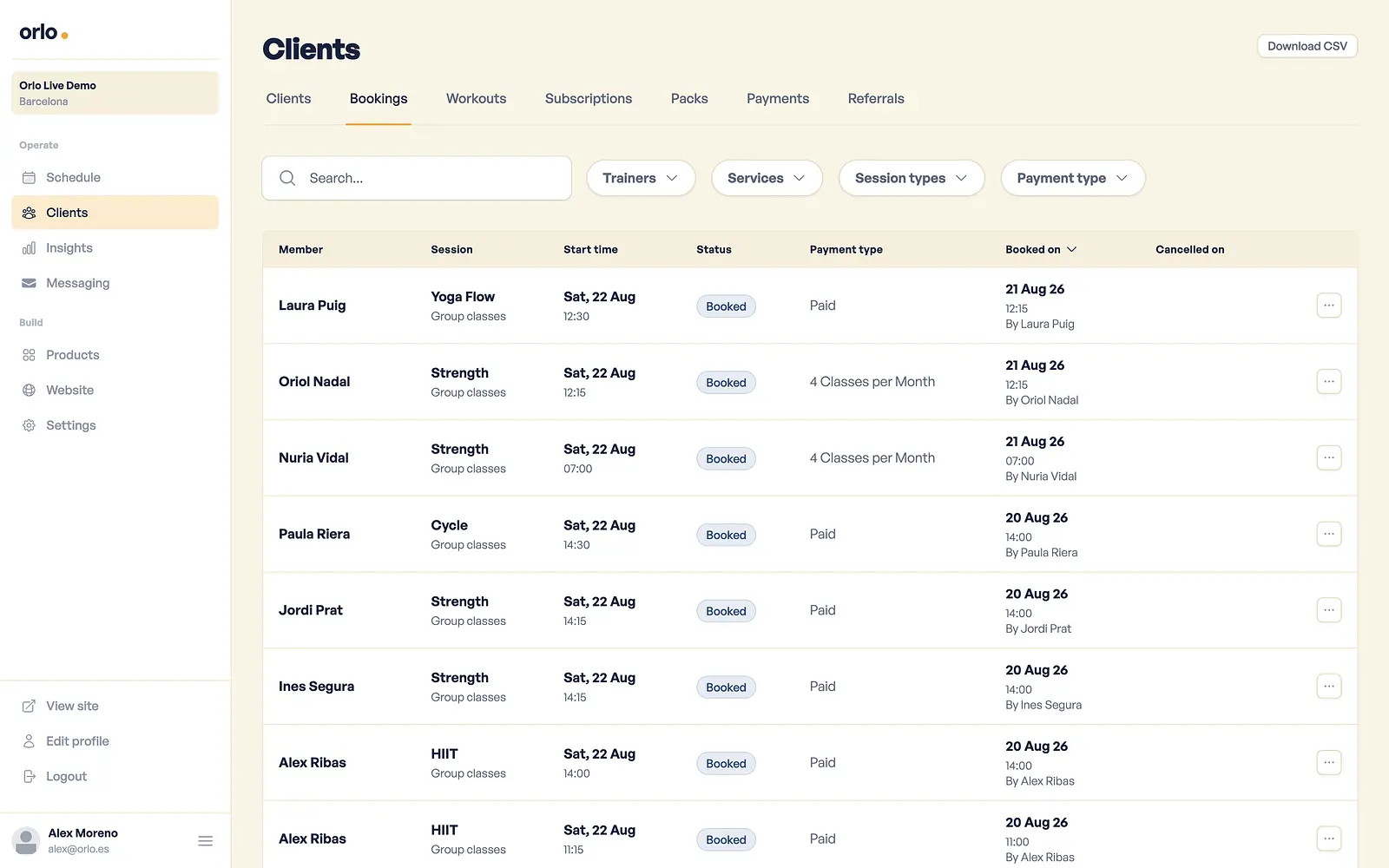
Orio gym management software clients interface displaying member bookings list

Your classes publish themselves

The next fortnight's classes go up to Wellhub as soon as they exist. Create one on Thursday afternoon and it's already there, with nothing to register by hand.

A cap on partner places

Set a maximum number of places for outside providers on a single class or across your weekly pattern. Leave it blank and they can book any free place.

Changes travel

Change a class's time, coach, room or length and its slot in Wellhub is updated to match — including when you move half a week at once from the weekly pattern.

Attendance by QR

Scan the member's code from the same register where you tick off everyone else. It's validated with Wellhub and recorded — no notebooks and no separate app at reception.

One record, not two

Anyone arriving through Wellhub gets a record in your gym. And if they were already a member of yours, they're recognised rather than duplicated: one history per person.

You choose which classes go into Wellhub

Nothing goes up until you say so. You pick the session types you want to offer and give them the name and description a Wellhub member will read — only those appear over there. Your small classes, your advanced ones and personal training stay for your own members if that's what you want.

And the capacity stays yours: if a class is full, it's closed to everyone.

Wellhub brings you people. Keeping them is up to you.

Every booking leaves something behind: who came, to which class, and how often. When somebody has been turning up on Tuesdays for a month, you see it on the same screen as your members — and you know who to offer a membership to, with their email right there.

Payment for that booking stays between Wellhub and your agreement with them: no Orlo payment goes through it.

Gyms that run on Orlo

Studios in Barcelona and beyond.
Barbara N.

"This is the best app I've seen at a gym, no other gym has one like this. It just works."

Barbara N.

Owner, Mov · Barcelona

Fit Mastery Sphere logo

"Even clients who work in web development have told us that the website is incredible, it doesn’t lack anything... It’s something people notice straight away."

Víctor Cabañero García

Owner, Fit Mastery · Barcelona

Questions, answered

Do I have to register every class in Wellhub?
No. The session types you pick are created there once, and from then on each class in your schedule goes up on its own inside the booking window. A nightly check confirms everything is in place.
Can I limit how many places Wellhub takes?
Yes. Each class takes a cap on places for outside providers, and you can set it on the weekly pattern so it applies to every class in that slot. Leave it blank and they can book any free place.
What happens when a class fills up?
Wellhub is told the class is full, so the member sees that message rather than a generic error. And the other way round: if somebody cancels and a place opens up, it is available in Wellhub again.
What if I move a class to another time?
It's updated in Wellhub with the new time, coach and room, as long as the class hasn't already started — once it's in the past, Wellhub won't accept changes to it.
How is attendance recorded?
From the class register, by scanning the member's QR code. Orlo checks the code is theirs, validates it with Wellhub and marks them as attended on the same screen where you tick off everyone else.
Does Orlo charge me for these bookings?
No payment goes through Orlo for a Wellhub booking — that's between Wellhub and you, under your agreement with them. The integration is included in your subscription at no extra cost.
Does it work with Urban Sports Club too?
Yes. Urban Sports Club has its own integration and behaves the same way: same classes, same capacity, same register. The cap on partner places counts both together.
What do I need to get started?
Your agreement with Wellhub, and a message to tell us you want it. We connect the two sides; you just choose which session types go in and the name a member will see them under.

Wellhub and Orlo

Stop running Wellhub on the side

One schedule, one capacity and one class register. Set it up this week and tell us you want Wellhub inside it.